
- Any web video
- Bilingual
- Bring your own AI key
Bilingual subtitles
for any web video
YouTube, Bilibili, Coursera, TED, course sites — install Magic Translator, open a video, click once, and the original line and its translation appear under the picture. No subtitles on the video? It listens and translates as it plays.
Four steps, one minute the first time
- 1
Install the extension
From the Chrome Web Store, or from the zip package. Then click the puzzle icon at the top right of the browser and pin Magic Translator to the toolbar.
- 2
Open a video
Any site works: YouTube, Bilibili, online courses, players embedded in news sites. Start playing it.
- 3
Pick how to use it
The first time you click the icon it asks: your own key, Easy mode or Local mode (see below). You can switch any time.
- 4
Click “Generate subtitles for this video”
Subtitles appear under the video right away, even in full screen. Alt + Shift + S starts and stops them.
Built-in captions, instantly
YouTube CC, Netflix subtitles and a video’s own text tracks are read in full and translated.
Listens when there are none
Captures this tab’s audio, turns speech into text as it plays, then translates it.
Full screen, any speed
Subtitles follow the video into full screen and stay in sync when you seek or play at 1.5×.
Your way
Both languages, original only or translation only; drag to move, adjust the size.
Instant next time
Finished subtitles are kept on your computer. Signed in, you can also reuse ones other people already made.
Course sites too
Finds videos inside players embedded from other sites (grant “all sites” once).
You choose where it translates and who pays
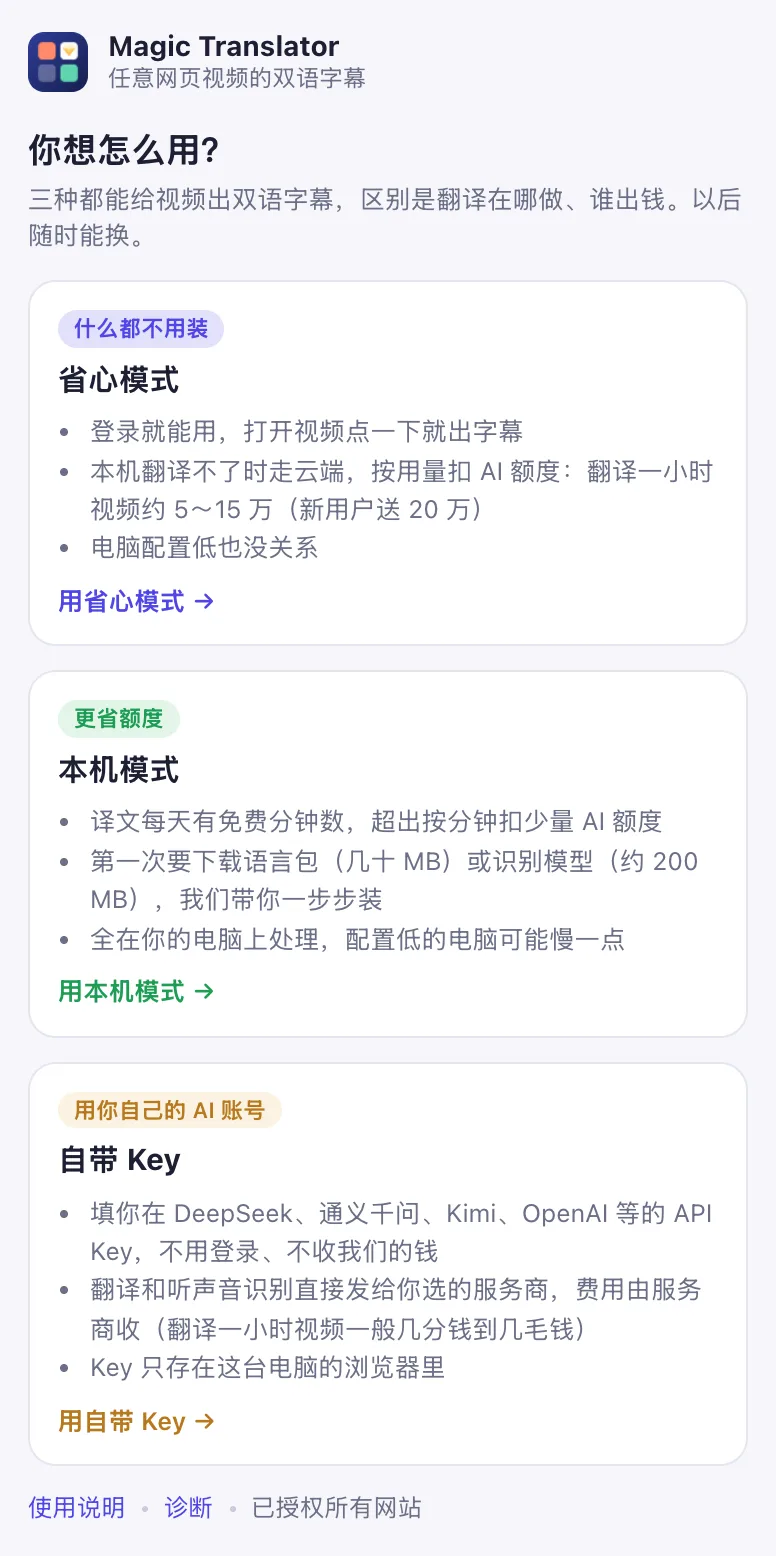
All three give you bilingual subtitles. Pick one the first time you open the popup; each has its own screen.
Your own key
You have an API key from DeepSeek, Qwen, OpenAI, Groq…
- No sign-in, nothing to pay us
- Translation and speech recognition go straight to your provider, never through our servers
- Your provider bills you: usually a few cents per hour of video
- The key stays in this computer’s browser
Easy mode
Just sign in and go
- Sign in with a Magic Grid account
- Cloud translation when the browser can’t translate, paid with AI credits (new accounts get 200,000)
- Reuse shared subtitles other people already made
Local mode
A decent computer and a one-time download
- Recognition and translation run on your computer (browser translator, local Whisper model)
- A setup page walks you through the one-time downloads
- First 30 minutes of translated subtitles free each day (300 with VIP), then a small per-minute fee
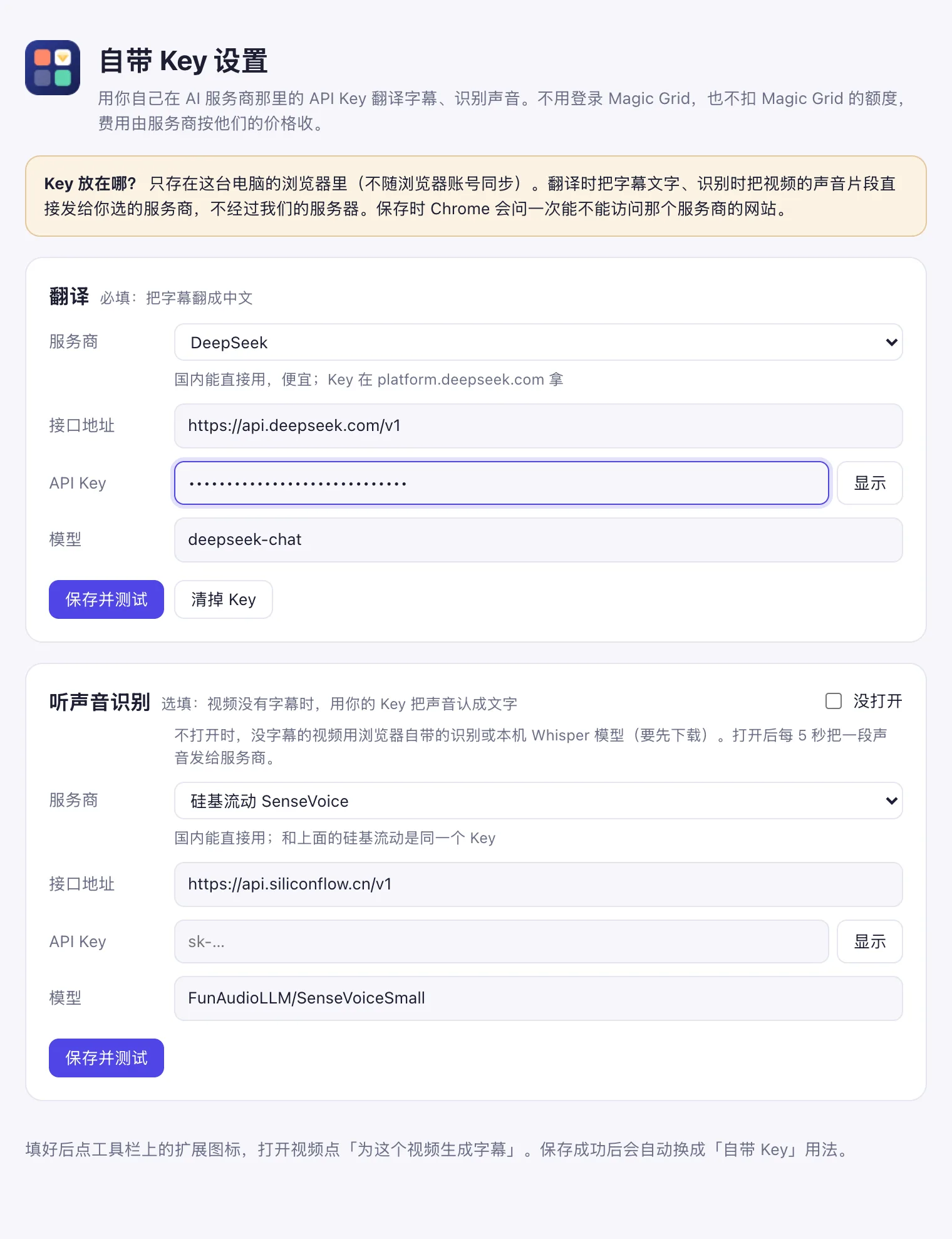
Use your own AI account in one minute
Pick a provider in settings, paste your key and click “Save and test” — it translates a sentence right there. Any OpenAI-compatible API works.
Translation
- DeepSeek
- Qwen (Alibaba)
- Kimi
- Zhipu GLM
- Doubao (Volcengine Ark)
- SiliconFlow
- OpenAI
- Google Gemini
- OpenRouter
- Any OpenAI-compatible API
Speech recognition (optional)
- SiliconFlow SenseVoice
- Groq Whisper
- OpenAI Whisper
Free with your own key. Pay only if you use ours.
VIP is a Magic Grid membership — the same account is VIP in Magic Capture, on the Magic Grid website and in the mobile app.
Free
$0No account needed
- Your own key: unlimited, you only pay your provider
- Built-in captions, local recognition and caching are free
- Local mode: 30 free minutes of translated subtitles a day
- New accounts get 200,000 AI credits — hours of cloud translation
VIP
From $3.99Magic Grid membership · one-time payments
- 300 free minutes of translated subtitles a day
- 2 million AI credits every month, lower cloud translation fee
- VIP in Magic Capture, on the website and in the mobile app too
From $3.99 / month — or ¥9.9 / month in CNY. Cards, Apple Pay, Google Pay, WeChat Pay and Alipay all work.
Questions
Is it free?
With your own key it is completely free — no sign-in, no limits; you only pay your AI provider. Built-in captions and local recognition are free too. Only our cloud translation (AI credits) and Local mode beyond 30 minutes a day cost a little; VIP gets 300 free minutes a day.
Is my key safe?
Your key is stored only in this computer’s browser. It is never sent to us and is not synced with your browser account. Subtitle text (for translation) and short audio clips (for recognition) go directly from your browser to the provider you chose. Chrome asks once for access to that one provider’s site.
What if the video has no subtitles?
It captures the tab’s audio and recognizes speech — Chrome asks you to allow audio capture the first time. Use your own key (SiliconFlow, Groq, OpenAI Whisper), the browser’s speech recognition or a local Whisper model.
No subtitles on YouTube?
YouTube only loads captions after the player asks for them: click the CC button once, then start. Videos with no captions at all fall back to listening.
Which browsers are supported?
Chrome, Edge and other Chromium browsers. Mobile browsers are not supported.
How is it related to Magic Grid?
Magic Translator is one of the Magic Grid tools — same account, AI credits and VIP. It used to be the “Video subtitles” tool in the Magic Grid bookmarks extension and became its own extension in November 2026.
Understand your next foreign-language video
Install, pin it to the toolbar, open a video and click once.
Install for free